

Menu
Menu
Menu
Menu
Menu
 Free Delivery On Everything
 Exclusive Trade Pricing
  Switch & Save With Compatibles
  Feefo Rated 4.7 (25k+ Ratings)
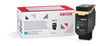
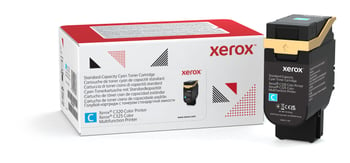
Xerox 006R04820 Cyan Toner Cartridge
Product Code: 006R04820

Original Xerox Product
Which printers does this work in?
£
Cost per page 4.68p
1 x
Cyan
1,800 Pages
In Stock - Delivered Wednesday
Order Within
Free Next-Day Delivery
Best Value - 1.18p per page cheaper
Xerox 006R04820 Cyan Toner Cartridge Product Details
The Xerox 006R04820 cyan toner cartridge brings vibrant colour to life with every print. Engineered for precision, this cyan cartridge produces vivid, eye-catching results that make your documents pop. From personal projects to corporate presentations, it delivers professional output every time.
At TonerGiant, we're committed to your satisfaction. Enjoy complimentary free shipping on all orders, backed by our renowned customer support team. You’ll experience print quality that exceeds your expectations, without the wait or worry.
Key Features
Vibrant colour production: This cyan cartridge is expertly crafted to deliver stunning, true-to-life colours that make your prints stand out.
Genuine Xerox cartridge: This is a genuine Xerox product and designed specifically for the Xerox C series, so you can rest assured that it’ll deliver the ultimate quality for your prints.
Long-lasting performance: This cartridge yields up to 1,800 pages, when printing at 5% coverage - keeping your printing costs down.
Why Choose TonerGiant?
Swift delivery - Order today and receive your cyan toner cartridge tomorrow with our complimentary shipping.
Expert assistance - Our friendly support team is at your service, ready to address any inquiries.
Huge product range: Explore our extensive selection of toner cartridges and printing accessories for every popular printing model.
What is a cyan printer cartridge?
A cyan printer cartridge contains a specialised toner powder that produces the color cyan – a vibrant blue-green which is one of the 4 cartridges essential for colour printing.
How do I replace a cyan toner in my Xerox printer?
Replacing the cyan toner in your Xerox printer is a straightforward process:
- Open the front panel of your printer to access the toner cartridge bay.
- Locate the cyan cartridge – it's typically marked with a blue label or icon.
- Gently pull the old cartridge straight out of the printer.
- Remove the new cyan cartridge from its packaging, being careful not to touch the imaging drum.
- Shake the cartridge horizontally a few times to distribute the toner evenly.
- Align the new cartridge with its slot and slide it in until you hear a click.
- Close the front panel and run a test print to ensure proper installation.
Remember, our support team is always available to guide you through the replacement process if you need additional assistance.
Product Specification
Brand
Xerox
Duty Cycle
Up to 1,800 pages at 5% coverage
Printing Colour
Cyan
Product Code
006R04820
Product Description
Xerox 006R04820 Cyan Toner Cartridge
Product Type
Toner
Warranty
6 Months
Frequently Asked Questions
We don't think you should pay more at the checkout, and we're proud to be one of the only printer cartridge suppliers to offer Free guaranteed next-day delivery to all mainland UK addresses.
Order before 5:30 pm on any working day and so long as the products are in-stock, your order will be delivered on the next-working-day.
We want you to have the best experience possible when shopping with TonerGiant. With over 20 years’ expertise, our friendly support team is here to help get you printing again quickly. You
can arrange a return through our returns form, or by calling us on 0345 365 3605.
If your product becomes faulty
- Original Cartridges: Return for a refund or replacement for up to 12 months.
- Compatible cartridges: Return for a refund or replacement up to 3 years.
Please contact us a soon as possible to request a returns number and arrange a free collection.
If you have ordered printer paper and it has arrived damaged, please refuse the delivery and let us know right away so we can arrange a replacement to be sent.
If you change your mind - 30 Days to Return:
- You have 14 days from delivery to arrange a return and an additional 16 days to return the items to us once arranged.
- Ordered incorrectly? We’ll provide a returns number and address for you to send to.
- Wrong item arrived – We’ll arrange a free collection of the incorrect product(s) and send a replacement.
After 14 days, you may still be able to return the product, but a 20% restocking fee will apply. After 30 days, returns are at our discretion.
Please note: Products must be returned unopened, unused, with all seals intact and in a resalable condition, or returns may not be accepted.
Find more information and our full returns policy on our returns & refunds page.
Save £21.32 with the High Quality TonerGiant brand alternative cartridge
Compatible Xerox 006R04820 Cyan Toner Cartridge
Product Code: RE006R04820
Printer Warranty Protected
Guaranteed to Work
Back In Stock Soon
Dispatched when stock returns
63.00
Free Next-Day Delivery
Usually bought together (4)
Customer Questions (0)
Be the first to ask a question about this product.
Need Assistance? We'll be happy to help! Call us on 0345 365 3605