Go to top
Item added to basket - Click here to view

My printer added - Click here to view

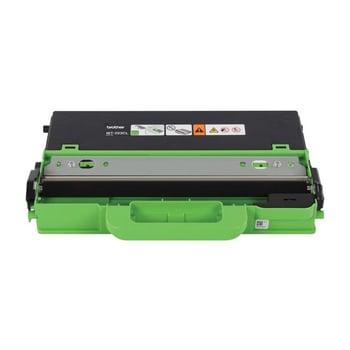
Brother WT223CL Waste Toner Unit

Product Code: BA79002
(9 Reviews)
Brother WT223CL Waste Toner Unit zoom
Original Brother Product
Which printers does this work in?
£16.38
£19.66 inc VAT

In Stock - Delivered Thursday
Order Within


Brother WT223CL Waste Toner Unit Product Details


Product Specification
Brand
Brother
Product Code
BA79002
Product Description
Brother WT223CL Waste Toner Unit
Product Type
Maintenance Product
Warranty
6 Months

Works in these printers


Frequently Asked Questions

How much does delivery cost and how long will it take?
We don't think you should pay more at the checkout, and we're proud to be one of the only printer cartridge suppliers to offer Free guaranteed next-day delivery to all mainland UK addresses.
Order before 5:30 pm on any working day and so long as the products are in-stock, your order will be delivered on the next-working-day.
What is the returns policy and how do I return a product?
We want you to have the best experience possible when shopping with TonerGiant. With over 20 years’ expertise, our friendly support team is here to help get you printing again quickly. You can arrange a return through our returns form, or by calling us on 0345 365 3605.
If your product becomes faulty
  • Original Cartridges: Return for a refund or replacement for up to 12 months.
  • Compatible cartridges: Return for a refund or replacement up to 3 years.
Please contact us a soon as possible to request a returns number and arrange a free collection.
If you have ordered printer paper and it has arrived damaged, please refuse the delivery and let us know right away so we can arrange a replacement to be sent.

If you change your mind - 30 Days to Return:
  • You have 14 days from delivery to arrange a return and an additional 16 days to return the items to us once arranged.
  • Ordered incorrectly? We’ll provide a returns number and address for you to send to.
  • Wrong item arrived – We’ll arrange a free collection of the incorrect product(s) and send a replacement.
After 14 days, you may still be able to return the product, but a 20% restocking fee will apply. After 30 days, returns are at our discretion.
Please note: Products must be returned unopened, unused, with all seals intact and in a resalable condition, or returns may not be accepted.

Find more information and our full returns policy on our returns & refunds page.

Product Reviews (9)


Brother WT223CL Waste Toner Unit 5
01 April 2026
As needed

Brother WT223CL Waste Toner Unit 5
27 January 2026
Fitted easily following the instructions on the leaflet and used guide for the printer.

Brother WT223CL Waste Toner Unit 5
18 December 2025
Fast delivery

Brother WT223CL Waste Toner Unit 4
15 December 2025
does what it supposed to do

Brother WT223CL Waste Toner Unit 3
31 July 2025

Brother WT223CL Waste Toner Unit 5
20 August 2024
Amazing service! The delivery was very quick. Arrived the next day. The product was superb quality. No issues whatsoever. The price was the cheapest that I found amongst everyone else. Would definitely recommend

Brother WT223CL Waste Toner Unit 5
12 February 2024
Very easy to fit, printer back to full health now.

Brother WT223CL Waste Toner Unit 5
20 December 2022
Excellent product, supa fast delivery

Brother WT223CL Waste Toner Unit 3
11 February 2022

Customer Questions (2)


Q
BA79002, brother mfc-l3710cw waste toner. Does it fit for this printer?
29 August 2025
A
Hi there, yes, the Brother MFC-L3710CW printer uses the BA79002 (WT-223CL) waste toner.

Q
How do I install this waste unit into my Brother DCP-L3550 printer?
27 June 2024
A
Please follow these steps to replace your waste toner unit.

1. Make sure your printer is switched off and then lift the top cover up.
2. Take your toner and drum unit out of the printer.
3. Take the belt unit out of the printer
4. Remove the waste toner box from the printer (this can now be recycled)
5. Unpackage your new waste toner box and put it into your printer.
6. Now put your transfer belt, toner and drum unit back into the printer.
7. Close the cover and switch your printer back on.
8. Done, You’re ready to print!

Need Assistance? We'll be happy to help! Call us on 0345 365 3605