

Menu
Menu
Menu
Menu
Menu
 Free Delivery On Everything
 Exclusive Business Pricing
  Switch & Save With Compatibles
  Feefo Rated 4.7 (25k+ Ratings)
Brother DCP-L3520CDWE Toner Cartridges
Save to My Printers
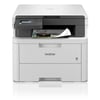
Need professional-quality documents without breaking the bank for cartridges? You’re in the right place. The Brother DCP-L3520CDWE toner cartridges on this page are expertly engineered for the Brother DCP-L3520CDWE printer and will have you back printing, scanning, and copying in no time. This 3-in-1 colour printer is an impressively sleek model from Brother’s line, and it’s only right to choose the most reliable cartridges. Shop now from TonerGiant’s range for unbeatable prices and free next day delivery with every order!
Filter Products (20)

Compatible Brother TN248XL High Capacity Toner Value Pack
Product Code: RETN248XLBKPACK
1 x
Black
3,000 Pages
1 x
Cyan
2,300 Pages
1 x
Magenta
2,300 Pages
1 x
Yellow
2,300 Pages
Printer Warranty Protected
Guaranteed to Work
In Stock - Delivered Wednesday
Order Within
202.58
Free Next-Day Delivery
Brother TN248XL High Capacity Toner Value Pack
Product Code: TN248XLBKPACK
1 x
Black
3,000 Pages
1 x
Cyan
2,300 Pages
1 x
Magenta
2,300 Pages
1 x
Yellow
2,300 Pages
In Stock - Delivered Wednesday
Order Within
338.39
Free Next-Day Delivery
Brother TN248 Toner Value Pack
Product Code: TN248VAL
1 x
Black
1,000 Pages
1 x
Cyan
1,000 Pages
1 x
Magenta
1,000 Pages
1 x
Yellow
1,000 Pages
In Stock - Delivered Wednesday
Order Within
158.21
Free Next-Day Delivery
Compatible Brother TN248XLBK High Capacity Black Toner - 3 Pack
Product Code: RETN248XLBK-3PACK
1 x
Black
3,000 Pages
1 x
Black
3,000 Pages
1 x
Black
3,000 Pages
Printer Warranty Protected
Guaranteed to Work
In Stock - Delivered Wednesday
Order Within
149.85
Free Next-Day Delivery
Compatible Brother TN248XLBK High Capacity Black Toner Cartridge
Product Code: RETN248XLBK
1 x
Black
3,000 Pages
£
Cost per page 1.80p
Printer Warranty Protected
Guaranteed to Work
In Stock - Delivered Wednesday
Order Within
54.00
Free Next-Day Delivery
Brother TN248XLBK High Capacity Black Toner Cartridge
Product Code: TN248XLBK
1 x
Black
3,000 Pages
£
Cost per page 2.63p
In Stock - Delivered Wednesday
Order Within
78.97
Free Next-Day Delivery
Brother TN248BK Black Toner Cartridge
Product Code: TN248BK
1 x
Black
1,000 Pages
£
Cost per page 4.82p
In Stock - Delivered Wednesday
Order Within
48.20
Free Next-Day Delivery
Compatible Brother TN248XLC High Capacity Cyan Toner Cartridge
Product Code: RETN248XLC
1 x
Cyan
2,300 Pages
£
Cost per page 2.39p
Printer Warranty Protected
Guaranteed to Work
In Stock - Delivered Wednesday
Order Within
55.00
Free Next-Day Delivery
Brother TN248XLC High Capacity Cyan Toner Cartridge
Product Code: TN248XLC
1 x
Cyan
2,300 Pages
£
Cost per page 3.95p
In Stock - Delivered Wednesday
Order Within
90.82
Free Next-Day Delivery
In Stock - Delivered Wednesday
Order Within
52.84
Free Next-Day Delivery
Compatible Brother TN248XLM High Capacity Magenta Toner Cartridge
Product Code: RETN248XLM
1 x
Magenta
2,300 Pages
£
Cost per page 2.39p
Printer Warranty Protected
Guaranteed to Work
In Stock - Delivered Wednesday
Order Within
55.00
Free Next-Day Delivery
Brother TN248XLM High Capacity Magenta Toner Cartridge
Product Code: TN248XLM
1 x
Magenta
2,300 Pages
£
Cost per page 3.94p
In Stock - Delivered Wednesday
Order Within
90.72
Free Next-Day Delivery
Brother TN248M Magenta Toner Cartridge
Product Code: TN248M
1 x
Magenta
1,000 Pages
£
Cost per page 5.24p
In Stock - Delivered Wednesday
Order Within
52.36
Free Next-Day Delivery
Compatible Brother TN248XLY High Capacity Yellow Toner Cartridge
Product Code: RETN248XLY
1 x
Yellow
2,300 Pages
£
Cost per page 2.39p
Printer Warranty Protected
Guaranteed to Work
In Stock - Delivered Wednesday
Order Within
55.00
Free Next-Day Delivery
Brother TN248XLY High Capacity Yellow Toner Cartridge
Product Code: TN248XLY
1 x
Yellow
2,300 Pages
£
Cost per page 3.99p
In Stock - Delivered Wednesday
Order Within
91.82
Free Next-Day Delivery
Brother TN248Y Yellow Toner Cartridge
Product Code: TN248Y
1 x
Yellow
1,000 Pages
£
Cost per page 5.25p
In Stock - Delivered Wednesday
Order Within
52.45
Free Next-Day Delivery
Compatible Brother DR248CL Drum Unit
Product Code: REDR248CL
1 x
Maintenance
30,000 Cycles
Printer Warranty Protected
Guaranteed to Work
In Stock - Delivered Wednesday
Order Within
37.14
Free Next-Day Delivery
In Stock - Delivered Wednesday
Order Within
101.08
Free Next-Day Delivery
In Stock - Delivered Wednesday
Order Within
87.42
Free Next-Day Delivery
In Stock - Delivered Wednesday
Order Within
18.28
Free Next-Day Delivery
Toner Cartridges for the Brother DCP-L3520CDWE
The Brother DCP-L3520CDWE printer uses TN248 toner cartridges in black, cyan, magenta, and yellow, and needs all four to deliver quality prints. The good news is, TonerGiant stock everything you could ever need for the Brother DCP-L3520CDWE, with options for all preferences. Here’s a breakdown of what the range on this page includes:
- Toner Value Packs are the best value for your money, providing you with four cartridges at a discounted price. Choose between genuine Brother packs, and compatible third-party packs. Toner Value Packs are also available in a high capacity option to remove the hassle of repurchases.
- Or, choose individual Brother DCP-L3520CDWE toner cartridges in black, cyan, magenta, or yellow - also available in two capacity options, from either Brother or our third-party manufacturer.
- Genuine Brother drum units can be found in the maintenance section of this page, to keep your documents streak free.
Features of the printer
The Brother DCP-L3520CDWE is a complete solution for your home or business’ office - printing, scanning and copying at first-rate speeds of 18 pages per minute. Despite its quick turn around, the DCP-L3520CDWE is surprisingly quiet whilst running, making it suitable for any space. It’s an eco-friendly model, featuring automatic double-sided printing to save paper and money. Plus with the Brother Mobile Connect app, you can print directly from your smartphone.
This model has a impressively high resolution of up to 2400 x 600dpi so you can be sure your documents will be crisp, and images bright and colourful. Shop the best quality toner cartridges from TonerGiant to guarantee your Brother DCP-L3520CDWE is working at its full potential.
How do I install a new toner in the Brother DCP-L3520CDWE printer?
If it’s time to install a new cartridge into your Brother DCP-L3520CDWE printer, don’t panic as it couldn’t be easier. Simply follow these steps:
- Once your printer is turned on, open the top cover until it locks in the open position
- Remove the toner cartridge and drum unit assembly and place on a clean, flat surface
- Push down the green lock lever and remove the toner cartridge from the drum unit
- Unpack the new toner cartridge and insert firmly into the drum unit until you hear it lock into place
- Slide the toner cartridge and drum unit assembly into the machine
- Close the printer’s top cover and leave on until the display returns to ‘ready mode’
How do I know my toner needs replacing in Brother DCP-L3520CDWE printer?
Common signs your DCP-L3520CDWE toner needs replacing include faded or streaky prints, or lines across the page. Keep your eye out also for warnings on the screen of the printer, specifying which cartridge is running low. It’s also easy to proactively check toner levels through the printer’s control panel menu. We recommend checking your toner levels regularly to keep your printer running smoothly.
To get a gauge of how long your toner should last, check out the chart below displaying the estimated lifespan of a Brother DCP-L3520CDWE toner cartridge based on your daily printing volume. These values apply to both genuine Brother cartridges and our high-quality compatible options for the DCP-L3520CDWE printer.
We’ve included the values for both normal and high capacity cartridges, to help you make your decision on which yield is best for you.
Pages Printed (Per day)
Brother DCP-L3520CDWE standard toner
Brother DCP-L3520CDWE High Capacity Toner
5
6 months, 21 days
19 months, 24 days
20
1 month, 3 weeks
10 months
50
2 weeks, 6 days
2 months
75
2 weeks
1 month, 10 days
*The information above is based on toner capacity guidelines produced by the ISO (international standardisation organisation). The capacities listed are based on 5% of toner coverage on an A4 piece of paper. This means that if you were to print images or large blocks of colour or text, your cartridge will run out much faster.
Frequently Asked Questions
We want you to have the best experience possible when shopping with TonerGiant. With over 20 years’ expertise, our friendly support team is here to help get you printing again quickly. You
can arrange to return a product through our returns form, or by calling us on 0345 365 3605.
If your product becomes faulty
- Original Cartridges: Return for a refund or replacement for up to 12 months.
- Compatible cartridges: Return for a refund or replacement up to 3 years.
Please contact us a soon as possible to request a returns number and arrange a free collection.
If you change your mind - 30 Days to return:
- You have 14 days from delivery to arrange a return and an additional 16 days to return the items to us once arranged (30 Days in total).
- Ordered incorrectly? We’ll provide a returns number and address for you to send to.
- Wrong item arrived – We’ll arrange a free collection of the incorrect product(s) and send a replacement.
After 14 days, you may still be able to return the product, but a 20% restocking fee will apply. After 30 days, returns are at our discretion.
Please note: Printer cartridges must be returned unopened, unused, with all seals intact and in a resalable condition, or returns may not be accepted.
Find more information and our full returns policy on our returns & refunds page.
We don't think you should pay more at the checkout, and we're proud to be one of the only printer cartridge suppliers to offer Free guaranteed next-day delivery to all mainland UK addresses.
Order before 5:30 pm on any working day and so long as the products are in-stock, your order will be delivered on the next-working-day.
Customer Questions (0)
Be the first to ask a question about this product.
Need Assistance? We'll be happy to help! Call us on 0345 365 3605